




Grok Imagine vs Veo 3 vs CogVideo: Best Grok Imagine Alternative (2026)
Grok Imagine is quick and lively, Veo 3.1 is polished and cinematic, and both make sound with the picture. CogVideo runs both of them, plus 6 more models, from one account and one credit balance.
 By CogVideo Editorial TeamUpdated 2026-10-08Last tested 2026-10-08
xAI's video model, now Grok Imagine Video 1.5. Fast, lively clips with sound, inside the Grok app or through the xAI API.
Best for Quick social clips with sound
Google's cinematic model, now Veo 3.1. Native audio, 1080p and 4K, reached through Gemini, Flow, and the Gemini API.
Best for Cinematic polish and 4K output
Grok Imagine, Veo 3.1 Fast, Seedance, MiniMax, and CogVideo models in one place. Pay by the clip.
Best for Running Grok Imagine and Veo 3.1 from one account
Visit CogVideoGrok Imagine vs Veo 3 comes down to speed against polish: Grok Imagine Video 1.5 is the fast, lively, cheaper option with sound, and Veo 3.1 is the cinematic option with sound and up to 4K. For animating your own photo, the best Grok Imagine alternative is CogVideo, because it runs Grok Imagine and Veo 3.1 Fast side by side in your browser and charges by the clip, so you never have to buy two subscriptions to use both.
We compared the two models on what matters when you turn an image into a video: picture quality, image to video, sound, limits, price, the Fast and Lite tiers, the developer APIs, and how you actually get access. Every Grok Imagine and Veo fact below comes from xAI's and Google's own pages, checked on 2026-10-08, and every CogVideo number comes straight from our live model catalog. Grok, Grok Imagine, Google, and Veo are trademarks of their owners; this is an independent comparison.
Grok Imagine
xAI's fast video model with sound
- Latest model
- Video 1.5
- Longest clip
- Up to 15s (API)
- Native audio
- Yes
- Video access
- Paid Grok plan
Strong at
- Fast renders for quick iteration
- Sound effects and dialogue in one pass
Small catch
- Video needs a paid Grok plan
Veo 3
Google's cinematic video model
- Latest model
- Veo 3.1
- Resolution
- 1080p and 4K
- Longest clip
- 8s, extendable
- Full access
- Google AI Ultra
Strong at
- Most realistic motion and lighting
- First and last frame control
Small catch
- Full Veo 3.1 sits on the top Google plan
Grok Imagine, Veo 3.1 Fast and more in one browser tab
- Video models
- 8 image to video
- Longest clip
- Up to 30s
- Grok Imagine
- From 91 credits
- Plans
- From $9.90/mo yearly
Strong at
- Grok Imagine and Veo 3.1 Fast from one account
- Pay by the clip, no Ultra plan
- Sound on most models, no GPU or install
Small catch
- With 8 models, first-timers may take a minute to choose
| Latest model | Grok Imagine Video 1.5 | Veo 3.1 (plus Fast and Lite) | 8 models incl. Grok Imagine and Veo 3.1 Fast |
|---|---|---|---|
| Native audio | Yes, SFX, ambience, dialogue | Yes, SFX, ambience, dialogue | Yes, on Grok Imagine, Veo 3.1 Fast, and CogVideo models |
| Longest clip | Up to 15s (API) | 8s, extendable | BestUp to 30s in one generation |
| Resolution | 720p in official examples | Best1080p and 4K | Up to 1080p |
| How you pay | Paid Grok plan, or per second on the API | Google AI plans; full Veo 3.1 on Ultra | BestPer clip, plans from $9.90/mo yearly, packs from $29.90 |
| Where you use it | Grok app, grok.com, xAI API | Gemini app, Flow, Vids, Gemini API | BestAny browser, no GPU or install |
Want to make your own? Try Image to Video, Text to Video or Pricing.
Grok Imagine video vs Veo 3.1 video quality
Veo 3.1 produces the more cinematic video of the two, while Grok Imagine video is faster and more lively. Google pitches Veo 3.1 for realistic motion, lighting, and prompt accuracy, and it shows in slow camera moves, faces, and product shots.
Grok Imagine Video 1.5 is tuned for speed and energy. xAI's launch post leads with how quickly a clip comes back and how much its motion and sound improved over the previous version, and it handles expressive, stylized, meme-ready shots well.
On CogVideo you do not have to pick one look for every project. Draft an idea on Grok Imagine, then render the hero shot on Veo 3.1 Fast from the same photo, in the same tab. When you want a different feel entirely, Seedance, MiniMax, and our own CogVideo v3 sit in the same model picker.
Grok Imagine
Strengths
- Fast renders, good for iterating
- Lively, expressive motion for social content
Watch-outs
- Official examples render at 720p
Veo 3
Strengths
- Most realistic motion and lighting of the two
- Strong prompt accuracy
- 1080p and 4K output
Watch-outs
- Full Veo 3.1 sits on Google AI Ultra, the top plan
CogVideo
Strengths
- Veo 3.1 Fast and Grok Imagine on one page, so you pick the look per shot
- 8 models to compare from a single photo
Watch-outs
- With 8 models in the picker, first-timers may take a minute to choose
Grok image to video vs Veo 3.1: animating your own photo
Best here: CogVideoGrok Imagine and Veo 3.1 both turn a still image into a video, and the image becomes the first frame of the clip. xAI's video guide shows image to video as a core mode of the API, and Google DeepMind lists image to video among Veo 3.1's core strengths, including on the budget Lite tier.
The difference is control. Veo 3.1 also takes a first and a last frame, so you decide where the shot finishes, which is handy for product reveals and transitions. Grok Imagine keeps it simple: one image, one prompt, a quick clip with sound.
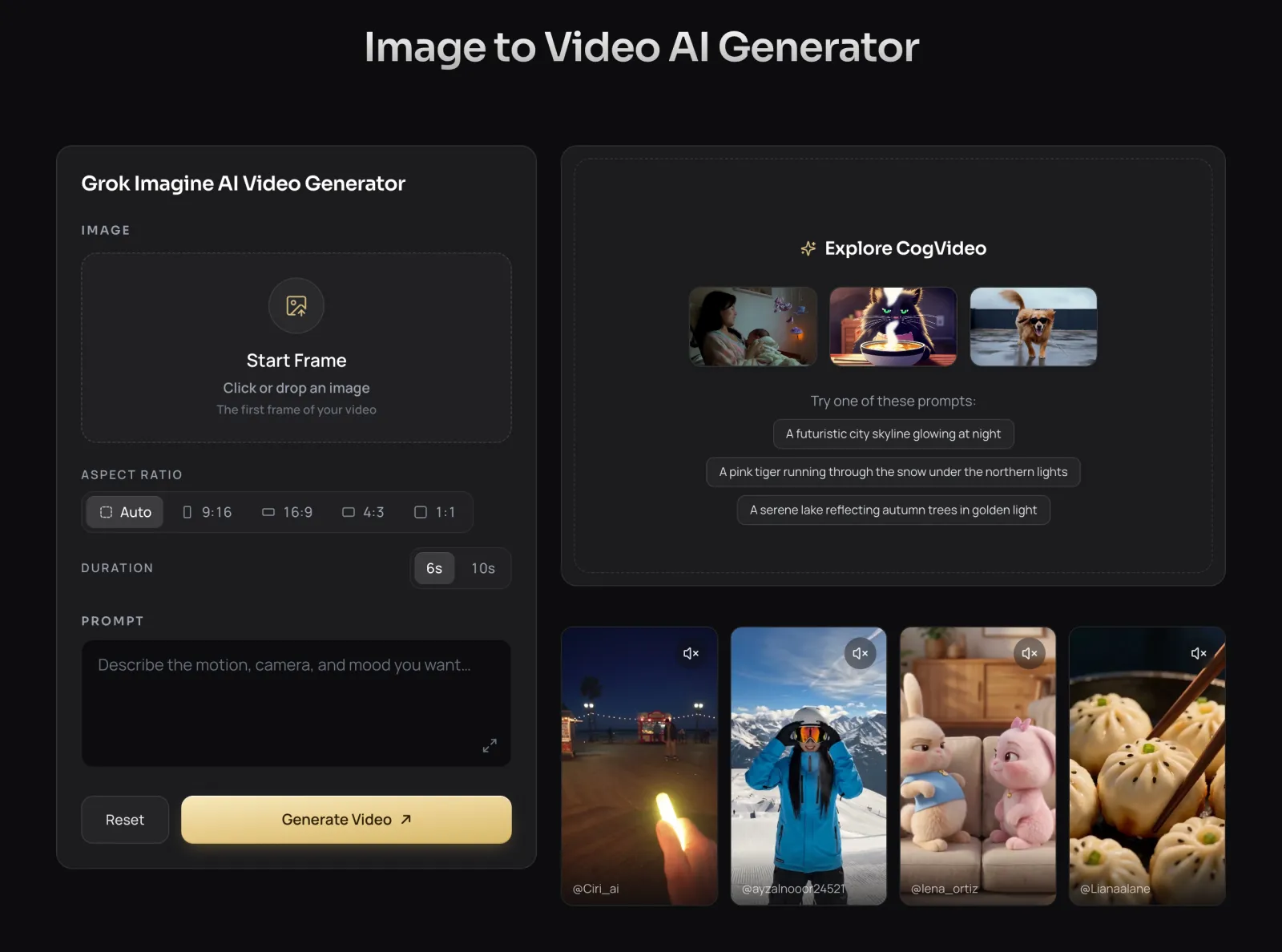
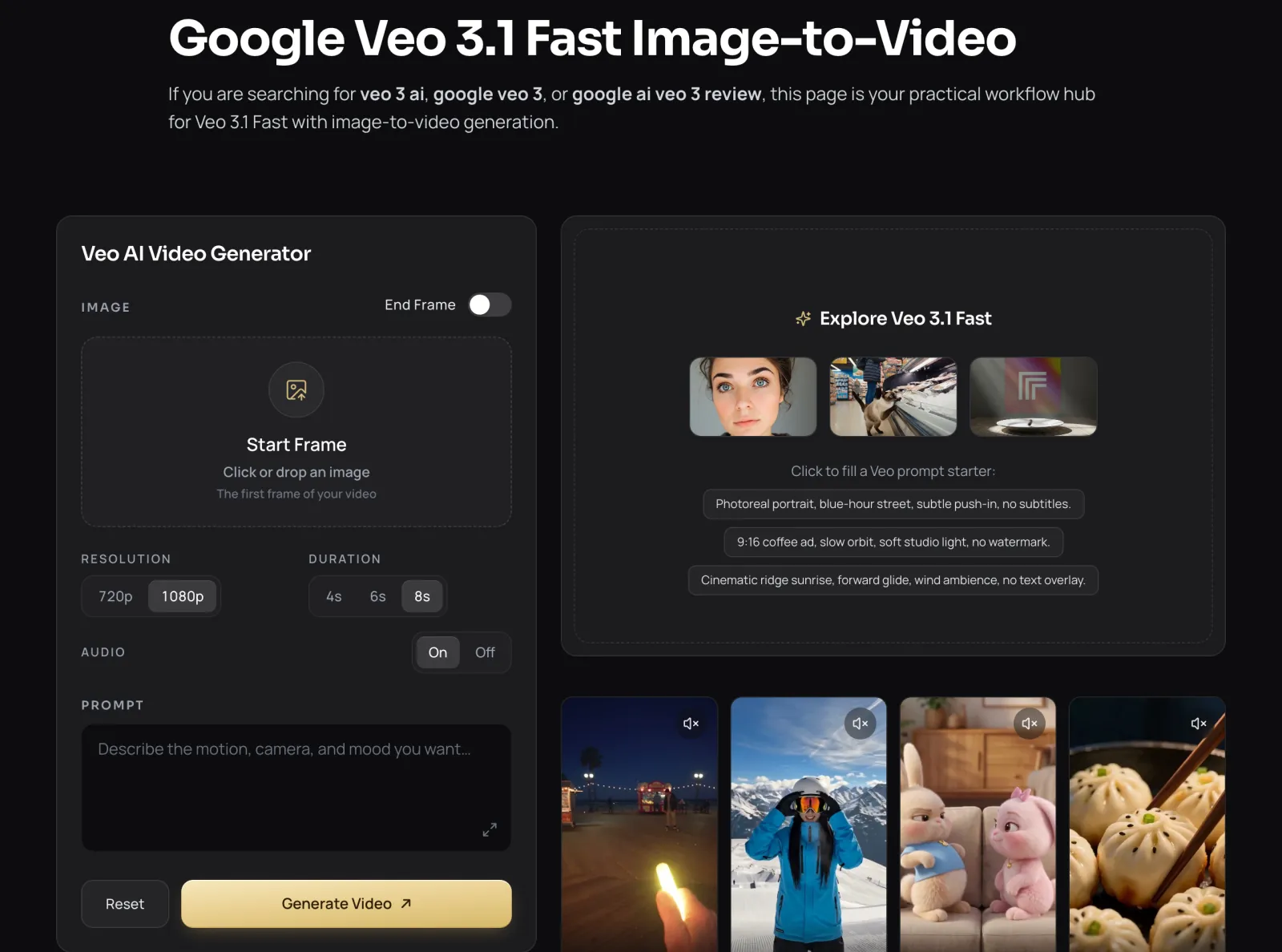
CogVideo is built around exactly this job. Upload your photo, describe what should happen, and pick a model. Aspect ratio can follow your photo automatically, so a vertical selfie stays vertical, and Veo 3.1 Fast on CogVideo keeps its end frame option.
Grok Imagine
Strengths
- Image to video with one image and one prompt
- Sound comes back with the clip
Watch-outs
- No end frame in the official examples
Veo 3
Strengths
- Image to video on every Veo 3.1 tier
- Start and end frame control
Watch-outs
- Lite tier tops out at 1080p
CogVideo
Strengths
- Both models animate your photo from the same upload
- Auto aspect ratio that follows your photo
- End frame on Veo 3.1 Fast
Watch-outs
- Each generation starts from one uploaded photo at a time
Which AI video generator has better sound?
Best here: CogVideoGrok Imagine and Veo 3.1 both generate sound natively, so either one gives you a clip with audio straight out of the model. Veo 3.1 generates sound effects, ambient noise, and dialogue with the video, and Google says audio now also works with its ingredients to video mode.
Grok Imagine Video 1.5 does the same in a single pass, and xAI says speech is now clearer and better synced to the action. Both models land sound on the action instead of laying a generic track over the clip.
On CogVideo, sound is part of most of the lineup: Grok Imagine, Veo 3.1 Fast, MiniMax, Seedance, and our own CogVideo models all return clips with audio. Veo 3.1 Fast also has an audio switch, so a silent B-roll shot costs fewer credits.
Grok Imagine
Strengths
- Sound effects, ambience, and dialogue in the same pass
- Clearer, better synced speech in Video 1.5
Veo 3
Strengths
- Native sound effects, ambience, and dialogue
- Audio also works with ingredients to video
Watch-outs
- Google lists natural spoken audio as still in active development
CogVideo
Strengths
- Native audio across Grok Imagine, Veo 3.1 Fast, and CogVideo models
- Audio on or off for Veo 3.1 Fast, so silent shots cost less
Watch-outs
- The audio switch only appears on models that offer it
Grok Imagine limits vs Veo 3.1 clip length
Best here: CogVideoGrok Imagine's main limits are clip length, resolution, and how many videos your plan allows, and Veo 3.1's main limit is its 8 second base clip. xAI's video guide allows durations up to 15 seconds on the API, and xAI's own examples run at 720p.
Veo 3.1 renders 8 second clips in 1080p or 4K, and scene extension stretches a story beyond that. Google keeps the highest Veo limits for AI Ultra, while AI Pro comes with a set number of Flow credits each month.
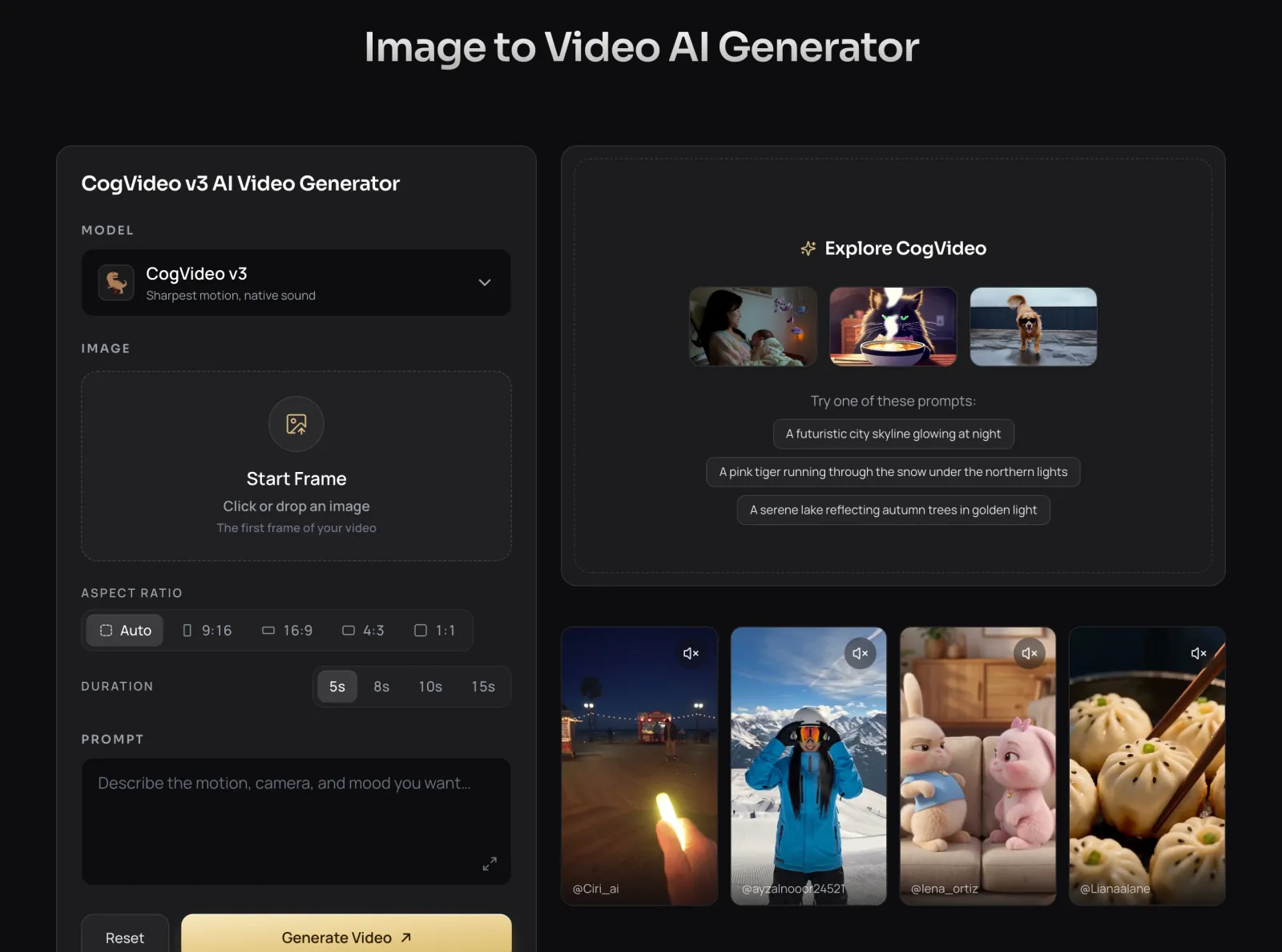
CogVideo covers the whole range from one picker: Grok Imagine at 6 or 10 seconds, Veo 3.1 Fast at 4, 6, or 8 seconds in 720p or 1080p, CogVideo v3 from 5 to 15 seconds, and Seedance up to 30 seconds in a single generation. You pick the length per clip instead of living with one model's ceiling.
Veo 3.1 clips are 8 seconds, extendable with scene extension. The Grok Imagine API goes up to 15 seconds. On CogVideo, Seedance renders up to 30 seconds in one generation.
Grok Imagine
Strengths
- Up to 15 seconds through the API
- Configurable duration and resolution
Watch-outs
- 720p in the official examples
Veo 3
Strengths
- 1080p and 4K output
- Scene extension for longer stories
Watch-outs
- Single clips are 8 seconds
CogVideo
Strengths
- Up to 30 seconds in one generation
- Up to 1080p with Veo 3.1 Fast
- Pick the length per clip, from 4 seconds up
Watch-outs
- A 30 second clip takes a little longer to render than a 6 second one
Is Grok Imagine free, and how much does Veo 3.1 cost?
Best here: CogVideoGrok Imagine video is not free: according to ClickUp's August 2026 guide, free Grok accounts get capped image generation but no video, and video needs SuperGrok at $30 a month. Developers can skip the subscription and pay per second on the xAI API, at $0.08 a second for Grok Imagine Video 1.5.
Veo 3.1 pricing depends on the tier and the route. Google AI Pro includes only a limited trial of Veo 3.1 Lite, and full Veo 3.1 sits on Google AI Ultra. On the Gemini API, The Decoder reports Veo 3.1 Lite at $0.05 a second for 720p and Veo 3.1 Fast at $0.10, with 4K Fast at $0.30.
CogVideo prices every model from one credit balance, per clip. Grok Imagine starts at 91 credits, and a default 8 second 1080p Veo 3.1 Fast clip with sound is 1,000 credits, with shorter or 720p clips costing less. Plans start at $19.90 a month for 1,800 credits, or $9.90 a month billed yearly, and one-time packs start at $29.90.
Grok Imagine
Strengths
- Per-second API billing for developers
Watch-outs
- Video needs a paid Grok plan
- App plans and API billing are separate
Veo 3
Strengths
- A trial of Veo 3.1 Lite on Google AI Pro
- Per-second API pricing by tier
Watch-outs
- Full Veo 3.1 needs Google AI Ultra, the top plan
CogVideo
Strengths
- Grok Imagine from 91 credits a clip
- Veo 3.1 Fast by the clip, no Ultra plan
- Plans from $9.90/mo billed yearly, or packs from $29.90
Watch-outs
- Every clip spends credits, so you top up when the balance runs low
Veo 3.1 Fast vs Veo 3.1 Lite: which Veo do you actually get?
Best here: CogVideoVeo 3.1 Fast is the stronger of the two cheaper Veo tiers, and Veo 3.1 Lite is the budget tier: Lite costs less than half as much as Fast, matches its speed, and stops at 1080p. Google launched Lite on March 31, 2026, with 4, 6, or 8 second clips in portrait or landscape.
Which one you get depends on where you use Veo. Google AI Pro subscribers get a limited trial of Veo 3.1 Lite, and the full Veo 3.1 model is reserved for AI Ultra. Grok has a similar ladder, with Grok Imagine Video 1.5, a Fast variant in the app, and a cheaper Lite model on the API.
CogVideo runs Veo 3.1 Fast, with 720p or 1080p, 4 to 8 second clips, sound on or off, and an end frame. You get the faster, higher tier by the clip, without stepping up to a top Google plan.
Grok Imagine
Strengths
- Video 1.5 Fast in the Grok app
- A cheaper Lite model on the API
Watch-outs
- Each tier lives in a different place, app or API
Veo 3
Strengths
- Lite at less than half the price of Fast, same speed
- Fast adds 4K
Watch-outs
- Google AI Pro gets only a Lite trial
CogVideo
Strengths
- Veo 3.1 Fast, not Lite, by the clip
- 720p or 1080p, 4 to 8 seconds, end frame
Watch-outs
- Veo runs in its Fast tier here, which is the tier most people pick
Grok Imagine API vs Veo 3.1 API for developers
The Grok Imagine API and the Veo 3.1 API both bill video by the second, and both support text to video and image to video. xAI made Grok Imagine Video 1.5 generally available on its Imagine API, and lists it at $0.08 a second, with an older model at $0.05 and a Lite model at $0.02.
Veo 3.1 is available through the Gemini API and Google AI Studio. The Decoder reports Veo 3.1 Lite at $0.05 a second for 720p and $0.08 for 1080p, and Veo 3.1 Fast at $0.10 and $0.12, so an 8 second 1080p Fast clip is about $0.96.
If you do not want to write code at all, CogVideo is the shortcut: the same two models in a browser, no API key, no polling for results, and every finished clip saved to your account. It is the easy way to test both before you build anything.
Grok Imagine
Strengths
- Generally available Imagine API
- Three price points from $0.02 to $0.08 a second
Watch-outs
- Requests are asynchronous, so you poll for the result
Veo 3
Strengths
- Gemini API and AI Studio access
- Lite, Fast, and full tiers to match budget
Watch-outs
- Pricing varies by tier and resolution
CogVideo
Strengths
- No code, no API key, no polling
- Test Grok Imagine and Veo 3.1 side by side first
Watch-outs
- Built for people who create in the browser
How to access Grok Imagine and Veo 3.1
Best here: CogVideoYou access Grok Imagine through the Grok app, grok.com, or the xAI API, and you access Veo 3.1 through the Gemini app, Google Flow, Google Vids, Google AI Studio, or the Gemini API. Each is a good home for its own model, and each only shows you that model.
Google Flow is where most people meet Veo 3.1: it is Google's AI creative studio for cinematic scenes, and the Google AI plans include Flow credits. Grok Imagine Video 1.5 Fast is available on grok.com/imagine and in the iOS and Android apps.
CogVideo puts both, plus 6 more models, in one browser tab. Sign in, upload a photo, pick a model, and your clips land in My Creations, so you can compare Grok Imagine against Veo 3.1 on the same image and keep the best take.
Grok gives you Grok Imagine and Google gives you the Veo family. CogVideo puts 8 image-to-video models side by side, including Grok Imagine and Veo 3.1 Fast, on a single credit balance.
Grok Imagine
Strengths
- Built into the Grok app and grok.com
- Generally available on the xAI API
Watch-outs
- Only Grok Imagine models
Veo 3
Strengths
- Gemini, Flow, Vids, AI Studio, and the Gemini API
Watch-outs
- Only Google models
- What you get depends on your plan tier
CogVideo
Strengths
- 8 image-to-video models in one picker
- Any browser on desktop or phone, no GPU
- Every clip saved to My Creations
Watch-outs
- Runs online only, there is no offline desktop app
The best Grok Imagine alternative: run both models in one place
The best Grok Imagine alternative is CogVideo, because it does not replace Grok Imagine, it adds to it: you keep Grok Imagine and get Veo 3.1 Fast and the rest of the lineup on the same account. Most people looking for an alternative want what Grok cannot give them alone, like longer clips, more polish, or no subscription.
CogVideo answers each of those. Need polish, switch the same photo to Veo 3.1 Fast. Need length, render up to 30 seconds in one go. Need to stay flexible, pay by the clip from a plan or a one-time pack instead of a monthly Grok or Google plan.
Grok Imagine and Veo 3.1 are two of the best image to video models of 2026, and they shine at different jobs. Here is who should use what, and in every case the simplest route runs through CogVideo.
You want Veo 3.1 quality for a few hero shots without paying for Google AI Ultra.
CogVideo runs Veo 3.1 Fast by the clip, with sound and an end frame.
You post short clips with sound every day and want them fast.
CogVideo runs Grok Imagine from 91 credits a clip, with no Grok subscription.
You need a clip longer than 15 seconds from a single photo.
CogVideo renders up to 30 seconds in one generation.
You are not sure which model suits your photo.
CogVideo lets you try Grok Imagine, Veo 3.1 Fast, and 6 more models on the same image and keep the best one.
How We Tested Grok Imagine and Veo 3.1
We read xAI's Grok Imagine Video 1.5 launch post, its video API guide, and its API pricing, Google DeepMind's Veo page, and Google's AI plans page on 2026-10-08, and we used only what those pages state. Google's own API pricing page asks for a sign-in, so Veo API prices come from The Decoder's report on the Veo 3.1 Lite launch.
CogVideo numbers come from our live model catalog and pricing, checked the same day. Credit costs follow the model and settings you choose, and the generator always shows the exact cost before you click Generate.
Grok Imagine vs Veo 3 FAQ
Is Grok Imagine better than Veo 3?
Grok Imagine is better for fast, lively clips and Veo 3 is better for cinematic, high resolution shots; both generate sound. On CogVideo you can run both on the same photo and keep the better take.
Is Grok Imagine free?
Grok Imagine video is not free. ClickUp's August 2026 guide reports that free Grok accounts get no video and that video needs SuperGrok at $30 a month. On CogVideo you can run Grok Imagine by the clip, from 91 credits.
Is Veo 3.1 free?
Veo 3.1 is not free in full. Google AI Pro includes a limited trial of Veo 3.1 Lite, full Veo 3.1 sits on Google AI Ultra, and the Gemini API bills by the second. CogVideo runs Veo 3.1 Fast by the clip.
How much does Veo 3.1 cost?
On the Gemini API, The Decoder reports Veo 3.1 Lite at $0.05 a second for 720p and Veo 3.1 Fast at $0.10, or $0.12 at 1080p. On CogVideo, a default 8 second 1080p Veo 3.1 Fast clip with sound is 1,000 credits.
What is the best Grok Imagine alternative?
CogVideo is the best Grok Imagine alternative for most people, because it runs Grok Imagine itself plus Veo 3.1 Fast and 6 more models from one account, priced by the clip.
Can Grok Imagine turn an image into a video?
Yes. Grok Imagine animates a still image with a text prompt, and the image becomes the starting point of the clip. CogVideo offers the same Grok Imagine image to video in the browser, next to Veo 3.1 Fast.
How long can a Grok Imagine video be?
xAI's video guide allows durations up to 15 seconds on the API. On CogVideo, Grok Imagine renders 6 or 10 second clips, and other models in the same picker go up to 30 seconds.
How long are Veo 3.1 videos?
Veo 3.1 clips are 8 seconds, and scene extension lets you build longer stories. Veo 3.1 Lite offers 4, 6, or 8 second clips, and Veo 3.1 Fast on CogVideo does the same.
What is the difference between Veo 3.1 Fast and Veo 3.1 Lite?
Veo 3.1 Lite costs less than half as much as Veo 3.1 Fast and matches its speed, but it stops at 1080p while Fast also offers 4K. CogVideo runs Veo 3.1 Fast.
Is there a Grok Imagine API?
Yes. Grok Imagine Video 1.5 is generally available on the xAI Imagine API at $0.08 a second, with cheaper older and Lite models. If you would rather not code, CogVideo runs Grok Imagine in the browser.
Does Grok Imagine make videos with sound?
Yes. Grok Imagine Video 1.5 generates sound effects, ambience, and dialogue in the same pass as the video. On CogVideo, Grok Imagine clips come back with sound, from 91 credits.
Can I use Grok Imagine and Veo 3.1 without two subscriptions?
Yes. CogVideo hosts both, and they draw from one credit balance that you top up with a plan from $9.90 a month billed yearly or a one-time pack from $29.90.
Sources and References
- xAI, Grok Imagine Video 1.5 announcement (accessed 2026-10-08)
- xAI docs, video generation guide (accessed 2026-10-08)
- xAI docs, API pricing (accessed 2026-10-08)
- Google DeepMind, Veo model page (accessed 2026-10-08)
- Google, Google AI plans and subscriptions (accessed 2026-10-08)
- The Decoder, Google's Veo 3.1 Lite cuts video generation costs by more than half (accessed 2026-10-08)
- ClickUp, How to use Grok Imagine (accessed 2026-10-08)
- CogVideo, image to video generator and model catalog (accessed 2026-10-08)
- CogVideo, pricing (accessed 2026-10-08)
Related
CogVideo Editorial Team
AI Video, CogVideo
The CogVideo team tests AI video generators hands-on. For this comparison we set up each tool, read the official pricing and terms pages, and checked every figure against the source on the tested-on date.
Try Grok Imagine and Veo 3.1 image to video on CogVideo
Upload a photo, pick a model, and get a clip with sound in minutes. No GPU, no install, and no separate xAI or Google plan.
Animate a photo on CogVideo